
Imagine using a mobile app where digital elements blend smoothly with the real world, where talking to your phone feels as natural as tapping the screen, and where everyday devices connect to your phone to help you without you even asking. Android app development is changing fast. Designers and developers now have the chance to create experiences that feel both magical and practical. Users want more than just flashy looks; they want apps that are easy to use, smart, and fit naturally into their daily lives. Future-ready UX means focusing on things like augmented and virtual reality, voice controls that feel like real conversations, and smart devices working together through the Internet of Things. When done right, apps can predict what users need, make tricky tasks simple, and even bring a bit of joy. In this blog, we’ll discuss why future-ready UX is so important for Android apps, the challenges of designing for AR/VR, voice, and IoT, how to build these features for your business, and the exciting possibilities they offer for the future.
Why Integrate AR/VR, Voice Control & IoT in Android Applications?
Integrating immersive technologies (AR/VR), voice control, and IoT into Android applications brings many benefits that make apps more powerful and user-friendly. Augmented and virtual reality (AR/VR) create exciting, immersive experiences that can help users learn, shop, or play in new ways. Voice control allows users to interact with apps hands-free, making it easier for people to use them while multitasking or for those with disabilities. The Internet of Things (IoT) connects smart devices, allowing apps to control home appliances, wearables, and more, creating seamless and convenient experiences. Together, these technologies improve user engagement and help businesses grow.
The Role of Future-Ready UX in Modern Android Apps
Design trends come and go, but users’ expectations only grow. People want mobile apps that are faster, smarter, and more connected to their real lives. Future-ready UX isn’t about chasing trends; it’s about making apps that feel easy, immersive, and truly helpful. For Android developers, using AR, VR, voice control, and IoT is no longer optional. It’s key to staying competitive. Here are the main reasons why future-ready UX is more important than ever in Android app development:
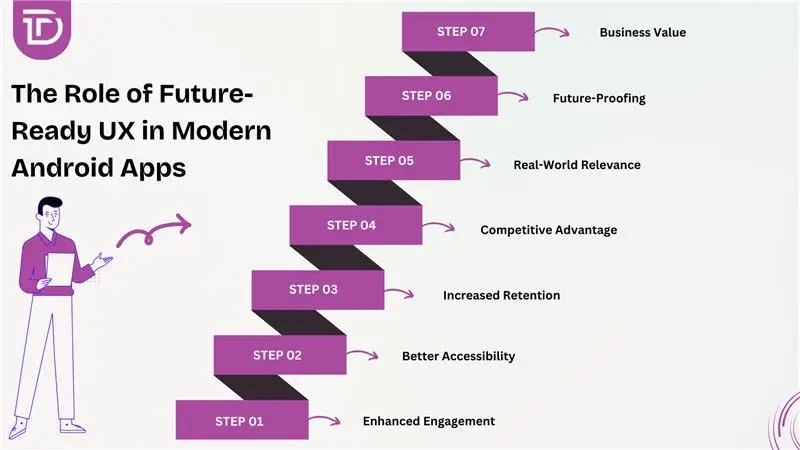
Enhanced Engagement
Users connect more deeply with mobile apps that offer immersive and interactive experiences. Traditional touch interfaces often feel stale, while AR, VR, and voice commands introduce novelty that sparks curiosity and emotional response. When apps feel alive and responsive to surroundings or voice, users are more likely to engage longer and develop a stronger attachment to the product.
Better Accessibility
Inclusive design is no longer optional—it’s essential. Voice control and IoT integration offer alternative ways to interact, especially for users with physical impairments or temporary limitations like driving or multitasking. These features reduce dependency on visual or touch input, making digital services more universally accessible and ensuring no user feels excluded due to interface constraints or limitations.
Increased Retention
Apps that delight users encourage repeated use. Future-ready UX features—like an AR-enhanced walkthrough or voice-powered task manager—add functional value and novelty that keep users interested. When an app feels intelligent, helpful, and adaptive to personal needs or environment, users are far more likely to return, reducing churn and increasing long-term engagement and customer loyalty.
Competitive Advantage
Differentiation is vital in the saturated Android app marketplace. Offering innovative UX through AR/VR visuals, voice interactivity, or IoT responsiveness gives your app an edge competitors might lack. Users are drawn to products that feel ahead of the curve, and early adoption of immersive or smart tech positions your brand as a forward-thinking industry leader.
Real-World Relevance
Users want apps that improve their real lives, not just digital routines. IoT-enabled Android apps connect smartphones to homes, vehicles, health devices, or workplaces—bridging the digital with the physical. When app functionality reflects what’s happening in the user’s real environment, the experience becomes more contextual, useful, and aligned with practical, everyday needs and behaviors.
Future-Proofing
Staying ahead of emerging technologies protects your investment. As devices like smart glasses, AR wearables, and intelligent voice assistants become mainstream, apps lacking compatibility risk becoming obsolete. Building with AR/VR, voice, and IoT in mind ensures your app remains usable and competitive in the evolving digital landscape, reducing the need for costly redevelopment later.
Business Value
Strong UX drives tangible results. When your app is easier to use, more engaging, and offers meaningful interactions, users are more likely to convert, recommend it, and remain loyal. Advanced features like AR demos or voice ordering also open new revenue streams. Ultimately, investing in future-ready UX boosts satisfaction, brand perception, and overall return on investment.
Challenges in Designing for AR/VR, Voice, and IoT Applications
Designing apps that combine AR, VR, voice control, and IoT technologies opens incredible possibilities, but it also comes with unique challenges. Balancing technical limitations, user environments, and security concerns requires thoughtful planning and execution. The following are some of the key obstacles developers face when building these advanced Android experiences:
Performance Constraints
AR, VR, and real-time IoT features demand significant processing power. Mobile devices often struggle with rendering, sensor input, and background tasks simultaneously. This can lead to lag, overheating, or battery drain, affecting user experience and overall app reliability.
User Context Variability
External conditions can impact functionality. Voice input may fail in noisy spaces, AR might not work in low light, and IoT connectivity could drop in certain environments. Designing for unpredictable contexts adds complexity to ensuring consistent performance.
Privacy and Security
Handling sensor data, location info, and voice recordings raises serious privacy concerns. Users must trust that data is secure, not misused, and collected with full consent. Strong encryption and clear permission flows are essential from the start.
Onboarding Complexity
New users may feel overwhelmed by AR controls, voice commands, or IoT device pairing. Without clear tutorials or guided walkthroughs, many might abandon the app early. Simplified onboarding is crucial to help users adopt these advanced features confidently.
Interaction Modality Conflicts
Combining voice, touch, and motion inputs can confuse users if not carefully designed. A voice command might interfere with a touch action or visual state. Creating a seamless, predictable interaction flow between modalities is both critical and challenging.
Testing Difficulty
AR/VR and IoT apps often require real-world environments or physical hardware for proper testing. Emulators rarely replicate these conditions accurately, making QA time-consuming and expensive. Broad device fragmentation also adds to testing complexity across Android ecosystems.
Standards Fragmentation
Lack of universal standards across AR SDKs, voice engines, and IoT protocols leads to integration issues. Developers may face compatibility problems, limited device support, or vendor lock-ins. Building scalable, maintainable solutions becomes harder without consistent cross-platform standards.
Steps to Develop an AR/VR, Voice, and IoT App for Your Business
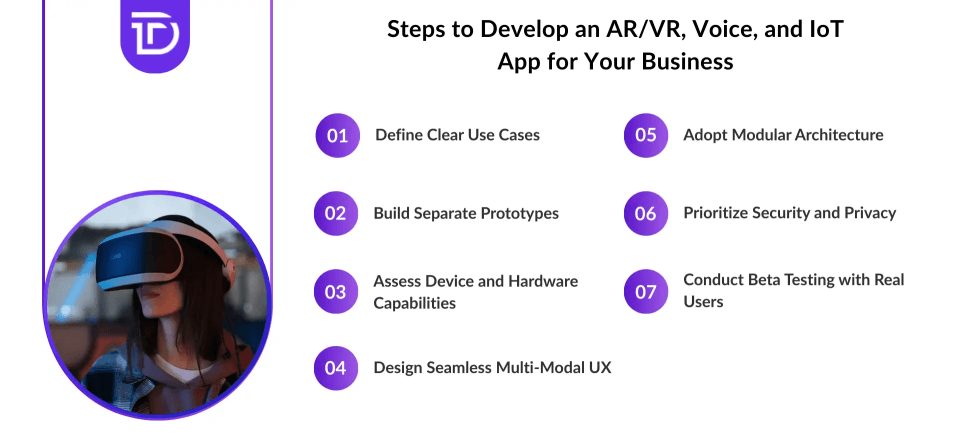
Developing an app that combines AR, VR, voice, and IoT requires careful planning and clear steps. Each technology adds complexity, so a structured approach ensures a smooth, practical, and reliable user experience. Below are the key steps to guide your development process:
Define Clear Use Cases
Start by identifying specific problems your app will solve using AR, VR, voice, or IoT. Focus on real-world scenarios where these technologies enhance user experience or improve efficiency. Well-defined use cases guide your development and keep the project focused on delivering real value.
Build Separate Prototypes
Create individual prototypes for each technology such as AR/VR visuals, voice commands, and IoT device interactions. Testing these components separately allows you to explore challenges early, refine each feature, and validate your concepts before integrating them.
Assess Device and Hardware Capabilities
Test prototypes on target Android devices to evaluate performance, responsiveness, and battery consumption. Different devices handle AR, voice processing, and IoT communication differently so understanding hardware limits helps optimize user experience.
Design Seamless Multi-Modal UX
Develop smooth transitions between AR/VR, voice, and IoT features. Users should effortlessly switch from talking to their device to interacting with AR visuals or managing IoT data overlays. Cohesive user flows prevent confusion and create a natural experience.
Adopt Modular Architecture
Organize your app’s codebase so each technology such as AR/VR, voice, and IoT operates as a separate module. This makes development more flexible, simplifies debugging, and makes future updates or platform expansions easier.
Prioritize Security and Privacy
Implement strong security measures to protect sensitive data like voice recordings, sensor info, and IoT device control. Be transparent with users about data collection, request permissions clearly, and ensure compliance with privacy laws.
Conduct Beta Testing with Real Users
Release your app to a diverse group of testers to gather feedback on usability and discover unexpected issues. Real-world testing helps verify that the combined AR/VR, voice, and IoT features work intuitively and reliably in everyday situations.
Best Practices for Building Future‑Ready UX in Android
Creating a future-ready UX for Android apps means more than just adding the latest technology. It requires thoughtful design focused on users’ real needs, performance, and adaptability. Balancing innovation with usability ensures apps stay engaging and accessible as technology evolves. The following best practices provide a solid foundation for building such experiences:
User-first design
Start by deeply understanding your users’ goals and needs before integrating advanced technology. Prioritize solving real problems over adding flashy features, ensuring the experience remains intuitive and genuinely valuable.
Multi-modal feedback
Enhance user interactions by combining visual signals, auditory sounds, and tactile (haptic) feedback. This multi-sensory approach reinforces user actions and improves engagement, making the experience more immersive and intuitive.
Scalable architecture
Build your app’s architecture with flexibility in mind, allowing you to easily add or remove input/output modalities without requiring a complete redesign. This ensures smoother updates and future-proof adaptability.
Performance optimization
Optimize for smooth framerates, efficient battery consumption, and minimal memory use, especially crucial for resource-intensive AR and VR apps. Maintaining high performance enhances usability and prolongs device life.
Accessibility focus
Design with accessibility in mind by incorporating voice controls, high visual contrast, and alternative gesture options. This inclusive approach ensures your app serves users with diverse abilities and needs.
Meaningful onboarding
Provide users with timely, contextual onboarding through tips, tutorials, or interactive guidance that help them quickly understand and use new features without overwhelming them.
Continuous analytics
Regularly monitor how users interact with AR/VR, voice, and IoT features. Use real behavior data to identify pain points and opportunities for refining and improving the user experience over time.
What’s Next for UX in Android App Development?
Wearables packed with sensors, AR glasses, and smart voice assistants are changing how users interact with their devices. People expect apps to be natural and easy to use, without extra steps getting in the way. Artificial intelligence will help apps learn what users like and need, so they can offer suggestions before users even ask. At the same time, new technologies like haptic feedback, spatial audio, and gesture controls will make digital experiences feel more real and engaging by involving multiple senses.
Android app development will also focus on connecting different devices smoothly. Imagine starting a task on your phone, then picking it up right where you left off on a smartwatch, smart home device, or AR headset without any interruptions. This kind of cross-device continuity will make apps more useful and less frustrating. Overall, future Android UX will be smarter, more connected, and easier to use, creating experiences that blend the digital world with everyday life naturally.
Future Opportunities and Business Potential of AR/VR, Voice, and IoT Applications
Immersive experiences are becoming a big deal in shopping and business. For example, AR virtual try-ons help customers see how products look before buying which can reduce returns and increase sales. Voice shopping is growing fast especially in places where typing on phones is not easy. IoT helps businesses and consumers save money by predicting when machines need fixing, using resources better, and automating tasks around the home or office. Companies that create easy to use, engaging apps will win customer trust and loyalty. AR can also help with training and support making learning faster and cheaper. Voice assistants improve customer service by making it smoother and easier to get help. IoT data can show ways to run businesses more efficiently. When all these technologies work together, apps will not just react to what you do, they will understand your needs and help you automatically, no matter which device you use.
The Bottom Line
User demand for intuitive, immersive, and interconnected experiences will only rise as technology evolves. Android apps that integrate AR/VR, voice control, and IoT interface elegantly can stand out by offering utility, delight, and accessibility. The key lies not just in adding advanced features but in weaving them into cohesive workflows. Teams that specialize in virtual reality app development services, alongside thoughtful UX design, secure foundations, and cross-modal harmony, will create apps that feel less like tools and more like trusted companions.
At Dreamer Technoland, we specialize in crafting forward-looking experiences that set your Android apps apart. Through our Android app development services, we cover AR and VR integration, voice user interface design, and seamless IoT connectivity, all tailored to fit your business needs. We work closely with you to deliver immersive engagement, easy-to-use interfaces, and smart automation built right into every app. We proudly offer dedicated project managers to keep your development smooth and transparent, use progressive technologies to future-proof your solutions, and provide three months of post-launch support to ensure everything runs flawlessly. When you partner with us, you get future-ready UX solutions designed with elegance, reliability, and a focus on delighting your users.