

Customer support teams face more tickets every year, and hiring more agents to keep pace doesn’t scale forever. Help desk automation changes that math by using software and AI to handle routine requests without a human picking up every single one. That shift matters for any business watching support costs rise faster than revenue.
According to Deloitte, intelligent automation can cut operational costs by an average of 31% over three years. That kind of saving signals a real opportunity: businesses that automate the right tickets free up budget and staff for the issues that actually need a human.
This blog breaks down how AI-powered help desk automation works, what separates good automation from a chatbot that frustrates customers, and where most teams go wrong. You’ll walk away knowing exactly how to evaluate it for your own team.
How AI-Powered Help Desk Automation Improves Customer Support
Support teams are drowning in tickets
Customer support used to mean phone queues and email threads that took days to clear. Now customers expect answers fast, and they switch brands quickly when they don’t get them. Research shows nearly 90% of customers consider an immediate response essential to good support, and “immediate” often means within ten minutes. That expectation puts real strain on teams still working through tickets one by one, by hand.
Help desk automation exists to close that gap. It’s not just a chatbot bolted onto a website; it’s a system that reads incoming requests, decides what they need, and routes or resolves them without waiting for someone to pick up the queue. Done right, it changes how fast a team responds and how many requests it handles without adding headcount every quarter.
Automation means more than a chatbot window
Teams getting real value from help desk automation treat it as an operating layer, not a feature. They connect ticketing tools, knowledge bases, and billing systems so one automated workflow can check an order status, issue a refund, or flag a security concern, all without a human typing the first response. That’s a far bigger scope of work than installing a chat widget, and it changes how you plan, budget, and build the system from day one.
This blog breaks down what that system looks like, what it costs to build well, and where teams go wrong. Here’s what you’ll walk away knowing:
- How help desk automation actually works behind the chat window
- Which benefits are realistic and which get oversold
- What features matter most when comparing platforms
- Real examples of automation handling support at scale
- The common mistakes that turn automation into extra work instead of less
What Is Help Desk Automation and Why It Matters
Three layers, not one tool
Help desk automation isn’t a single piece of software. It’s a stack of three layers that get more capable as you move up them. The first layer runs on rules: simple if-then logic that sorts a ticket by keyword or routes it to a queue based on category. Most support teams already have this layer, usually built into whatever ticketing tool they bought years ago and never upgraded.
The second layer adds Natural Language Processing, or NLP, to understand what a customer actually means, not just the words they typed. Instead of matching keywords, the system reads intent: a message about “my order hasn’t shown up” gets routed as a shipping issue even if the customer never uses that phrase. This is where automation starts feeling less mechanical and more like a person reading the ticket closely.
Where agentic AI changes the equation
The third and most capable layer is agentic ai for help desk automation: agents that don’t just classify a ticket but act on it directly. These agents check a database, process a refund, update a shipping record, or close a loop entirely, moving across connected systems the way a trained human agent would. Few support teams run this layer end to end today, but it’s the layer that actually cuts manual work instead of just organizing it better.
Building this well rarely happens with an off-the-shelf install. It usually calls for real help desk automation software development: wiring your CRM, billing tools, and knowledge base together so the automation has something to act on, not just tickets to sort into folders. Teams that skip this step end up with a system that looks automated on the surface but still needs a person to finish every task underneath.
Key Benefits of Implementing Help Desk Automation
A help desk automation platform earns its place in the budget by changing how many tickets a team handles, not by adding another dashboard nobody checks. Before comparing platforms, it helps to separate what looks good on a sales deck from what actually changes for agents and customers day to day. The Benefits of a help desk automation platform show up in three places: time, cost, and consistency, and the data backs that up.
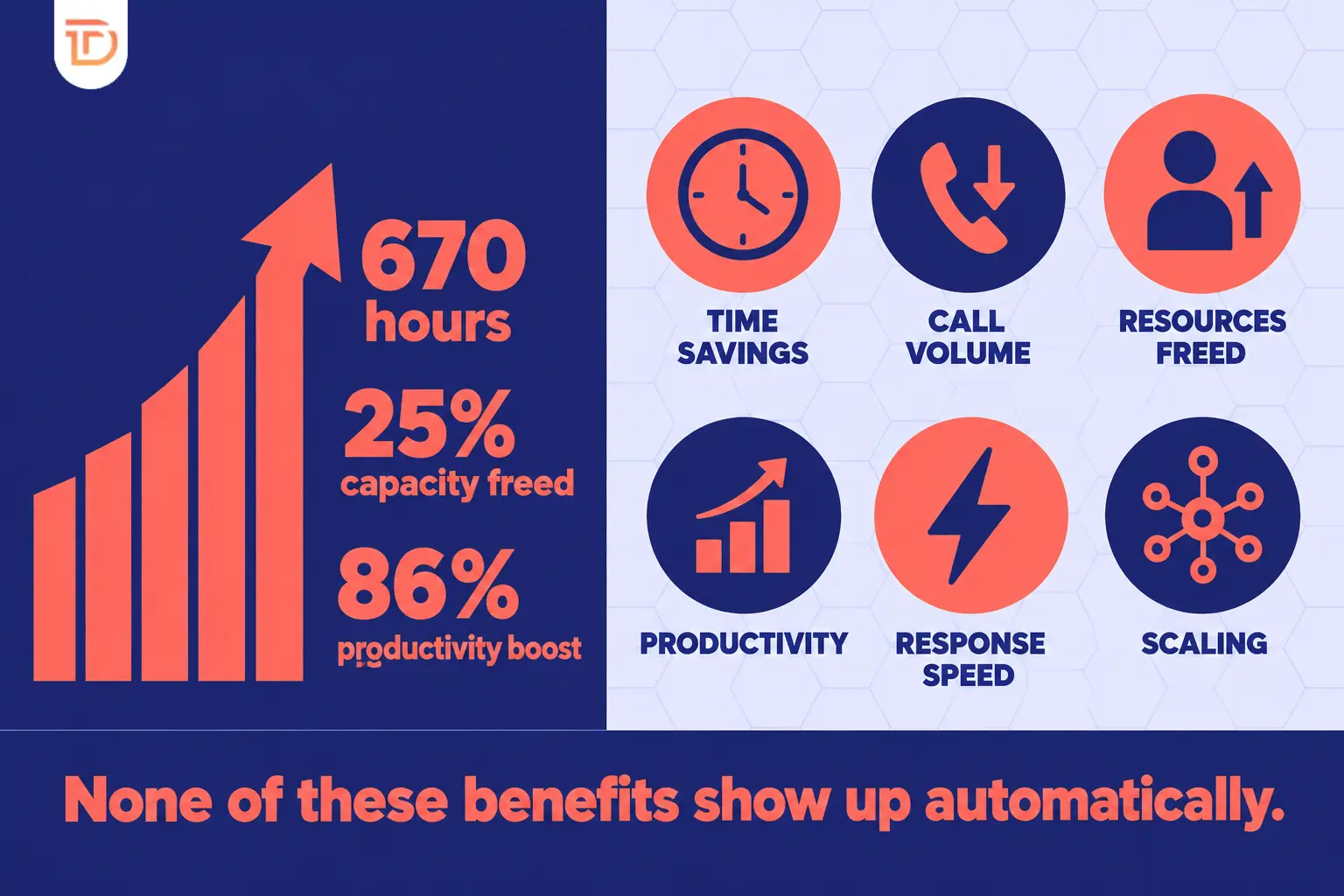
- Time savings: automation saves teams close to 670 working hours a year by cutting repetitive manual sorting and replies.
- Lower phone volume: automated self-service and chat handle routine questions, cutting inbound phone calls by around 10%.
- Resources freed for real problems: automation frees up to 25% of help desk capacity for incidents that genuinely need a person’s judgment.
- Productivity gains: 86% of companies report that automation boosted employee productivity rather than just adding another tool to manage.
- Faster first response: automated routing and reply drafts cut the wait before a customer hears anything, which matters since response speed drives satisfaction more than almost anything else.
- Scaling without headcount: automation absorbs volume spikes, like a holiday surge or a product recall, without forcing you to hire and train temporary staff on short notice.
None of these benefits show up automatically. They depend on the automation matching how your team actually works, not a generic template someone else designed for a different business.
A platform built for a generic support queue won’t necessarily handle your specific refund rules, loyalty tiers, or escalation paths. That’s why some businesses look past ready-made tools and invest in Custom software development instead of bending their workflow to fit someone else’s defaults. The cost is higher upfront, but the fit is exact, and exact fit is what turns these benefits from a pitch deck into real numbers on your support dashboard.
Essential Features to Evaluate in Automation Software
Picking a help desk automation platform without checking feature fit is how teams end up paying for capability they never use. Your channel mix (email, chat, phone, SMS), your integration needs, and how much you want the AI to handle on its own should all shape the shortlist before price does. Two platforms at the same price point can differ sharply in how much they actually automate versus how much they just organize for a human to finish.
The table below lays out five widely used platforms across the attributes that matter most for a support team evaluating automation.
| Platform | Starting Price (per user/month) | Omni-Channel Support | AI Chatbot | Ticket Routing Automation | Integration Ecosystem |
|---|---|---|---|---|---|
| Zendesk Support | $5 to $199 | Yes | Yes | Yes | Strong (large app marketplace) |
| Salesforce Service Cloud | $25 to $300 | Yes | Yes | Yes | Very strong (Salesforce ecosystem) |
| Freshdesk | $15 to $99 | Yes | Yes | Yes | Good (mid-size app catalog) |
| ServiceNow CSM | $125 to $175 | Yes | Yes | Yes | Strong (enterprise ITSM tools) |
| Dynamics 365 Customer Service | $50 to $95 | Yes | Yes | Yes | Strong (Microsoft ecosystem) |
All five options offer the basics: omni-channel coverage, chatbots, self-service portals, and routing rules. The real differences show up in NLP sophistication and how deep the integration ecosystem runs into your other business tools. Start by checking channel coverage and integration needs against your current stack, then rank platforms by how much real AI sophistication they bring versus how much marketing language they attach to a basic rules engine.
Real-World Examples of Help Desk Automations in Action
Numbers from a vendor’s website are easy to write off as marketing. What’s harder to dismiss is what happens when real companies put automation in front of real customers and measure the result.
- Hyundai cut response time to 22 seconds. Hyundai deployed Yellow.ai’s helpdesk module to handle incoming chat volume and personalize resolutions instead of routing everyone to the same script. The result was an average response time of 22 seconds, a number that’s nearly impossible to hit with a human-only queue during peak hours.
- Yellow.ai’s email automation handles 80% of inbound queries. Using generative AI, the system reads complex emails, picks out multiple intents in a single message, and flags urgency or sentiment before a human ever opens the thread. It automates up to 80% of incoming email volume while still following company guidelines on tone and policy, which shows how far AI development services have moved beyond simple auto-replies.
- Decagon connects support across payment and ticketing systems. Decagon’s platform links directly to Zendesk, Salesforce, and Stripe, carrying context across chat, email, voice, and SMS so a customer never repeats their issue twice. Clients including Notion, Duolingo, and ClassPass use this setup to keep support consistent across every channel a customer picks.
Common Challenges When Automating Customer Support Operations
Automation doesn’t fail loudly. It fails quietly, by adding friction nobody notices until tickets start piling up again or customers start complaining about being misunderstood by a bot. Knowing the common failure points before you build is cheaper than discovering them after launch.
- Over-automation on high-risk requests. Not every ticket should run through a bot. Requests tied to identity verification, account wipes, or security incidents carry real consequences if the automation gets it wrong, and those cases need a human in the loop before anything executes.
- The workload paradox. A recent SolarWinds survey of 844 IT professionals found 52% reported their workload actually increased after adopting AI automation. That happens when automation gets bolted onto a messy process instead of redesigning the workflow it’s meant to replace.
- Integration complexity. Automation is only as good as the systems it connects to, and legacy tools, fragmented data, and multiple disconnected platforms make that connection hard. Teams often need real Web application development work to modernize the systems automation has to plug into before it can act reliably.
- Change management and staff resistance. Agents who’ve handled tickets manually for years don’t always trust a system making decisions for them, and retraining takes real time and patience to get buy-in.
- Accuracy and edge cases. AI misreads intent often enough that teams need a clear escalation path for anything the system can’t confidently resolve on its own.
- Automation decay. Rules written two years ago stop matching how the business actually runs today, and workflows quietly go stale until someone audits them.
Treat automation as a living system, not a one-time setup. The teams that get the most out of it review and retrain their workflows on a schedule, the same way they’d review headcount or budget.
Building Your AI-Powered Help Desk With Dreamer Technoland
Deciding how to build or upgrade a help desk automation system is harder than picking a vendor off a comparison chart. It means understanding your actual workflows, choosing the right mix of rules, NLP, and agentic AI, and getting that system to talk to tools you already rely on every day.
Why this is a build decision, not just a buy decision
Dreamer Technoland works on this problem from the ground up, not from a template. Our background in AI development services and automation design means we look at your support data first and build the workflow around it, instead of forcing your team into someone else’s defaults. That difference shows up later in fewer edge cases breaking the system and fewer tickets that silently fall through.
We can architect the full system end to end: NLP workflows for intent routing, agentic AI that acts across your CRM and billing tools, and support dashboards built with Data visualization solutions so your team sees what’s actually happening, not just ticket counts. For teams that need support on the go, we also build Mobile app development services into the mix, and our core Business automation solutions tie the whole workflow together from first ticket to final resolution.
Contact Dreamer Technoland today for a free automation assessment session.
FAQ Section
Q. What is the difference between help desk automation and a chatbot?
A chatbot handles conversation on the front end. Help desk automation includes that plus routing, prioritization, and backend actions like refunds or record updates, often without a human finishing the task.
Q. How long does it take to implement help desk automation?
Mid-sized implementations typically take 6 to 8 weeks, covering data preparation, system integrations, workflow design, and testing. Larger builds with deep agentic AI capability usually take longer.
Q. Which support requests should not be automated?
A: Avoid automating requests tied to identity verification, account wipes, security incidents, or anything hard to reverse if it goes wrong. Routine requests like password resets or status checks are safe to automate.
Q. What ROI can we expect from help desk automation?
Industry estimates suggest automation can save around 670 working hours a year and free up to 25% of help desk capacity. Most companies also report real gains in staff productivity.
Q. Does help desk automation reduce customer satisfaction?
Not if it’s built well. Poorly designed automation frustrates customers by misreading intent; well-designed systems with clear escalation paths usually improve response speed and consistency instead.