

Android app development trends decide more than what your app looks like. They decide whether your app still works well two years after launch, or needs a costly rebuild. Apps like Google Pay and Samsung’s own suite already show where the platform is heading.
According to Statista, Android holds roughly 85% of the global mobile OS market, with the Google Play Store hosting more than 3.04 million apps competing for user attention. That scale means getting your android app development services strategy right matters more than ever, because the gap between a trend-aware app and an outdated one shows up fast in reviews and retention.
This blog walks through the ten trends worth your budget in 2027, and tells you plainly which ones matter for your specific build, not just which ones sound exciting.
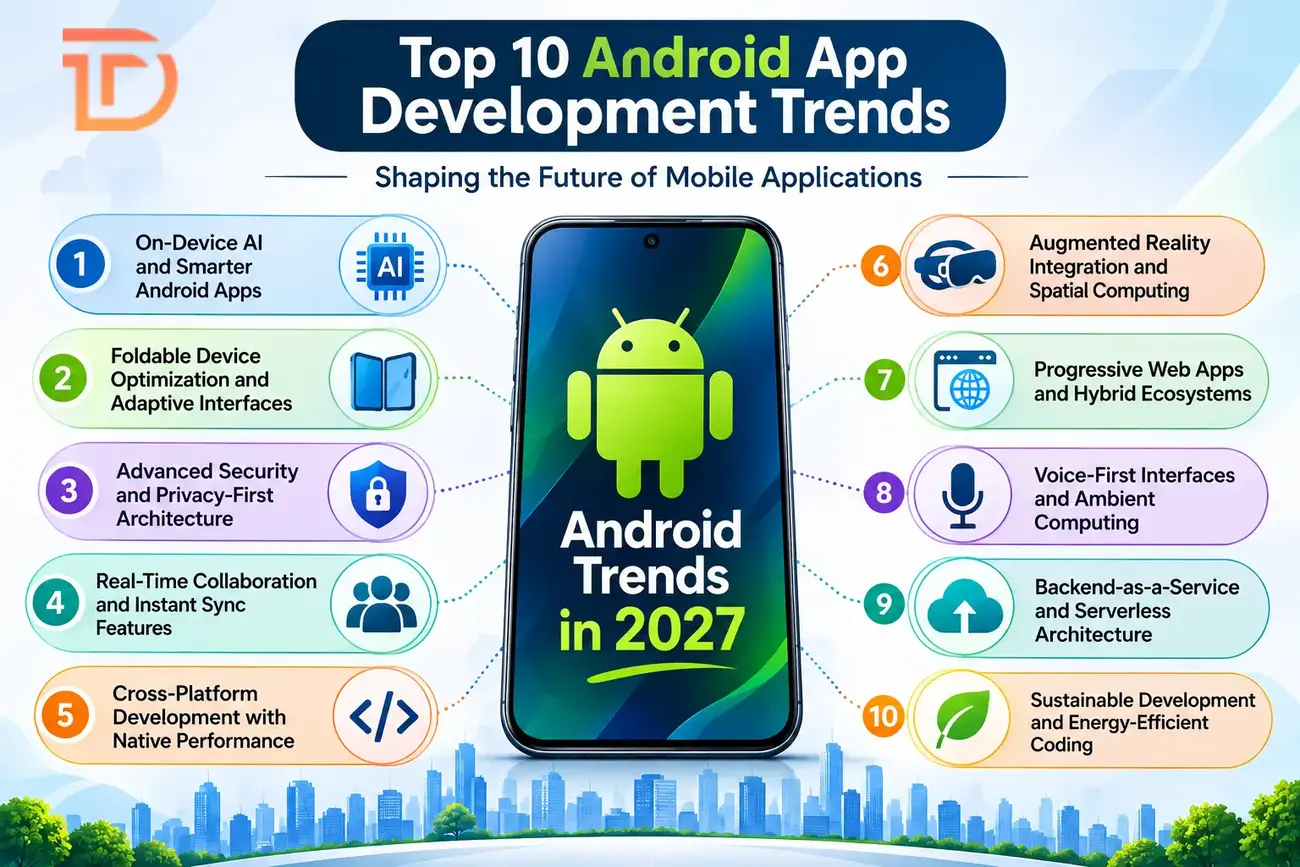
Android App Development Trends Shaping the Mobile Landscape in 2027
Android has moved far past being just an operating system. It’s a full ecosystem that shapes how businesses build, launch, and scale apps for millions of users at once. Every founder planning a build this year needs to know which android app development trends actually affect budget, timeline, and user retention, not just which ones sound exciting in a tech blog.
The real question business owners ask isn’t “what’s trending.” It’s “what should I invest in, and what can I safely skip?” That answer changes based on your industry, your user base, and how much ground your competitors have already covered. A fintech app has different priorities than a retail app chasing foldable screen users, and treating them the same wastes money on both sides.
This blog breaks down the Top 10 android app development trends worth your attention this year, and tells you honestly which ones matter for your specific build. Partnering with a team offering real android app development services gives you an edge, because chasing trends without the right execution partner burns budget fast and rarely ships on time.
By the end of this guide, you’ll know exactly where to place your next development dollar. Here’s what you’ll walk away with:
- Clear view of which AI features actually improve retention
- Practical guidance on foldable and adaptive screen support
- Security standards your app needs to meet by 2027
- An honest cost-benefit read on cross-platform versus native builds
- A sense of which trends are hype and which are here to stay
Why These Trends Matter Now for Your Android Development Strategy
Chasing every new trend wastes budget. The smarter move matches trends to business outcomes you actually need, whether that’s retention, speed to market, or lower support costs. Staying current with the latest Android app development trends isn’t about looking modern. It’s about avoiding the rebuild that happens when your app architecture can’t support what users expect two years from now.
Think about this: teams that build with future-ready architecture from day one spend less on retrofits later. A loyalty app built without biometric login in 2024 needed a costly security overhaul by 2026, because users stopped trusting password-only apps. That’s the real cost of ignoring trends, not missed hype, but rework you could have avoided.
This is why smart founders treat trend awareness as risk management, not marketing. Choosing the right Mobile app development services partner early means your build absorbs these shifts without needing a second budget cycle. The goal isn’t following every trend. It’s picking the three or four that protect your investment the longest.
1. On-Device AI and Smarter Android Apps
On-device AI changes what “smart app” means. Instead of sending every request to a cloud server, apps now run machine learning models directly on the phone. That shift matters for speed, privacy, and cost, three things every founder cares about when reviewing a build quote.
What On-Device AI Actually Enables
Tools like TensorFlow Lite, Google ML Kit, ExecuTorch, and Apple Core ML let developers run AI in Android app development without constant internet dependency. A photo app can tag images instantly. A translation app works on a flight with no signal. Processing locally also means user data never leaves the device, which matters under privacy laws that keep tightening every year.
The business case is concrete, not theoretical. An eCommerce startup that added an AI-powered chatbot cut support emails by 40% within two months, simply by answering common questions instantly instead of routing them to a queue. That’s not a hypothetical efficiency gain, it’s a direct cost reduction founders can measure on their next support bill.
Local Processing vs Cloud Trade-offs
On-device AI isn’t free of trade-offs. Local models are smaller and less powerful than cloud-based ones, so complex reasoning tasks still need a server round trip. The smart approach uses AI integration in mobile applications selectively: fast, privacy-sensitive tasks stay local, while heavier computation goes to the cloud.
The real win with on-device AI isn’t the technology itself, it’s the user experience gain: faster responses, offline reliability, and stronger privacy, all without added server cost.
2. Foldable Device Optimization and Adaptive Interfaces
Foldable phones stopped being a novelty. Samsung, Google, and other OEMs now ship multiple foldable models every year, and that means apps need to work across screen sizes that change mid-session. Ignoring this isn’t a minor oversight anymore, it’s a visible bug users notice the moment they unfold their phone.
Designing for a Screen That Changes Shape
Adaptive interfaces now need to handle three states: folded, unfolded, and the transition between them. A shopping app that looks fine folded might show broken layouts once unfolded into tablet mode. Developers use responsive grid layouts, flexible navigation patterns, and screen-state listeners to keep content readable no matter the fold position.
This is one of the clearer android app development innovations to plan for early, because retrofitting foldable support after launch means redesigning core layout logic, not just tweaking visual styles. Hardware constraints add another layer: hinge placement, aspect ratio shifts, and multi-window support all affect how content resizes on the fly.
Build for foldable screens at the wireframe stage, not after launch. Retrofitting adaptive layouts into an app built for a single screen size costs far more than designing flexible layouts from day one.
The payoff is real. Apps that handle folding smoothly keep users on larger foldable screens longer, which usually means more time in-app and more conversions for commerce and media apps chasing engagement.
3. Advanced Security and Privacy-First Architecture
Security stopped being a backend checkbox. Users now expect biometric logins, encrypted data, and apps that don’t leak information the moment a server gets breached. Any app relying on plain passwords alone looks outdated against 2027 standards.
What Users Expect By Default
Security features now expected by users include biometric logins through face or fingerprint scans, end-to-end encryption, and compliance with regulations like GDPR. Passwordless authentication using passkeys and biometric verification has moved from “nice to have” to baseline expectation. Apps that skip these features lose user trust fast, especially in finance, health, and e-commerce categories where a breach makes headlines quickly.
Privacy-by-Design and Zero-Trust Thinking
One of the clearer android development trends 2027 points toward is zero-trust architecture, where no request gets automatic trust, even from inside the app’s own network. Every call gets verified before it proceeds. Privacy-by-design means building data minimization into the app from day one, not bolting it on after a compliance audit flags a gap. Teams exploring Generative AI development services for security monitoring are also using AI models to flag unusual login patterns before they turn into breaches.
Security is no longer a feature you add before launch. It’s a design decision you make in the first planning meeting, because retrofitting encryption and biometric auth after launch costs far more than building it in from day one.
4. Real-Time Collaboration and Instant Sync Features
Users expect instant updates now, not a refresh button. Whether it’s a shared document, a live order tracker, or a group chat, apps that lag behind real-time feel broken compared to competitors that sync instantly.
Building the Infrastructure Behind Instant Sync
Real-time features run on WebSocket connections or gRPC protocols instead of older request-response patterns, because these keep a constant channel open between app and server. Offline-first architectures matter too: apps cache data locally and sync the moment a connection returns, so users never lose work because of a dropped signal on a train or elevator.
Common use cases include shared document editing, live notifications, and instant messaging, all of which depend on backend systems that can push updates without the app asking first. This shift shows where the future of Android app development is heading: less waiting, more live interaction baked into ordinary tasks.
Performance optimization matters just as much as the feature itself. Poorly built sync logic drains battery and data fast. Many teams now pair this work with AI automation solutions to manage sync conflicts and prioritize which updates reach the user first, keeping apps responsive even under heavy load.
5. Cross-Platform Development with Native Performance
Building separate codebases for Android and iOS used to be standard practice. Now, it’s often the more expensive choice, and founders who insist on fully native builds for both platforms frequently pay for work that cross-platform tools handle just as well.
Frameworks Changing the Build Calculus
Flutter, React Native, Kotlin Multiplatform, and .NET MAUI now let teams share large portions of code across Android and iOS. Among emerging Android technologies, these frameworks matter most for budget-conscious founders, because they cut duplicate development work without forcing a full compromise on performance.
| Framework | Code Sharing | Best Fit |
|---|---|---|
| Flutter | High | Startups needing fast, affordable builds |
| React Native | High | Teams with existing JavaScript expertise |
| Kotlin Multiplatform | Moderate | Apps needing shared logic, native UI |
| .NET MAUI | Moderate | Teams already using Microsoft’s stack |
A startup that switched to Flutter cut development costs by approximately 50%, simply by building one codebase instead of maintaining two separate ones.
Where Native Still Wins
Cross-platform frameworks aren’t the right call every time. Apps with heavy graphics work, deep hardware integration, or complex animations still perform better with native code. Teams building anything involving Machine learning app development features often still lean native for the processing-heavy parts, while using cross-platform frameworks for the UI layer.
The right choice isn’t cross-platform versus native, it’s knowing which parts of your app actually need native performance and which parts don’t. Most apps only need native code for a small fraction of total features.
6. Augmented Reality Integration and Spatial Computing
Augmented reality stopped being a gimmick for filters and games. Retailers now use it to let shoppers preview furniture in their living room before buying, and real estate apps use it for virtual property tours that cut down on wasted site visits.
What Makes AR Practical Now
Google ARCore handles real-time object tracking and environmental understanding, letting apps place digital objects convincingly into a live camera view. These android app development technologies now work reliably on mid-range phones, not just flagship devices, which widens who can actually use AR features day to day. 5G networks enable the low-latency performance that real-time tracking and cloud-rendered AR experiences need, cutting down the lag that made early AR apps feel clunky and slow.
Where AR Actually Pays Off
Retail virtual try-on, real estate tours, and education apps that let students examine 3D models are the clearest use cases right now. Teams building these features with Flutter app development services can add AR support without duplicating effort across platforms. The integration challenge isn’t the technology itself anymore, it’s designing an experience that feels useful rather than gimmicky, which is where most AR features still fall short in practice.
7. Progressive Web Apps and Hybrid Ecosystems
Not every business needs a full native app on day one. Progressive web apps let founders test demand with something installable, offline-capable, and far cheaper to build than a native Android app from scratch.
What PWAs Can Actually Do Now
Service workers let PWAs cache content and work offline, something that wasn’t reliably possible a few years back. Users can install a PWA straight to their home screen without visiting the Play Store, which removes a real friction point for first-time adoption. Capability expansion means PWAs now access push notifications, camera functions, and location data, closing much of the gap with native apps.
When a PWA Fits and When It Doesn’t
PWAs make sense for content-heavy apps, early-stage products testing demand, and businesses that need presence across devices without separate builds. They fall short when an app needs deep hardware access, heavy background processing, or Play Store visibility for discovery. Understanding Cross-platform app development cost differences helps founders see why a hybrid strategy, PWA first, native later, often protects budget during the early validation phase of a product.
A PWA isn’t a lesser version of your app idea. It’s a faster, cheaper way to prove the idea works before committing to the higher cost of a full native build.
8. Voice-First Interfaces and Ambient Computing
Typing is becoming optional for a growing number of app interactions. Voice search, smart replies, and hands-free commands now shape how users expect to interact with apps, especially while driving, cooking, or multitasking through a busy day.
Where Voice and Ambient Computing Are Headed
Google Assistant’s capabilities keep expanding past simple commands. Google announced a “Scheduled Actions” feature for Google Assistant at CES 2020, letting users control more than 20 home devices, from lights to coffee machines to AC units, on a set schedule. That kind of ambient, context-aware control is exactly where voice interfaces are heading inside Android apps too, not just on smart speakers sitting on a shelf.
Why This Connects to the Bigger IoT Picture
Global IoT connections are tripling to 25 billion by 2025, which means apps increasingly talk to devices beyond the phone itself. An Android app with voice support isn’t just convenient, it’s becoming the control layer for everything from home security to connected appliances. Founders planning this kind of integration should understand how the Cost of Android app development rises when voice and IoT features enter scope, since natural language processing and device communication both add real engineering work.
Voice features aren’t a nice add-on anymore. For apps tied to smart homes, cars, or wearables, voice is becoming the main interaction method, not a backup option.
9. Backend-as-a-Service and Serverless Architecture
Backend infrastructure used to be the slowest, most expensive part of building an app. Serverless platforms changed that math, letting small teams ship features that once needed a full backend engineering team on payroll.
What Serverless and Low-Code Actually Remove
Low-code and no-code platforms now handle a lot of backend complexity without writing custom server code:
- FlutterFlow: visual builder with direct Flutter code export
- Adalo: drag-and-drop app building for simple workflows
- Thunkable: beginner-friendly builder for cross-platform apps
- Glide: turns spreadsheets into working apps fast
- SAP Build Apps: enterprise-grade low-code for business workflows
- Appy Pie: no-code builder aimed at small business apps
Serverless architecture also removes a lot of DevOps overhead: no server to patch, auto-scaling built in, and lower latency because cloud providers route requests to the nearest data center automatically.
Where the Trade-offs Show Up
Serverless isn’t free of limits. Complex business logic or apps needing tight control over infrastructure still benefit from traditional backends. The decision often mirrors the Native vs. cross-platform app development trade-off: faster and cheaper versus more control and customization. Most early-stage apps gain more from serverless speed than they lose from reduced flexibility, especially when validating an idea fast matters more than scaling on day one.
10. Sustainable Development and Energy-Efficient Coding
Battery drain and slow load times aren’t just annoyances, they’re ranking factors. Users uninstall apps that eat battery life fast, and app store reviews reflect that frustration directly within days of launch.
Why Efficient Code Is Now a Design Priority
Green coding principles focus on writing algorithms that do less unnecessary work: fewer background processes, smaller image files, and leaner API calls. One project doubled load speed by reducing homepage images by 40%, which led to improved app ratings within weeks of release. That’s a clear example of how performance work and sustainability work overlap, since lighter apps use less energy and load faster at the same time.
The Long-Term Case for Lean Apps
Energy-efficient coding isn’t just good for the planet, it protects device health and keeps users on older phones able to run your app smoothly without lag. Apps that drain battery push users toward deleting them regardless of how useful the features are underneath. Building with performance budgets from the start, limiting image sizes, caching smartly, and avoiding unnecessary background tasks, pays off in both user retention and lower server costs over time.
Fast, light apps keep users longer than feature-heavy ones. A smaller, faster build often beats a bigger one packed with features nobody asked for.
Build Your Next-Generation Android App With Dreamer Technoland
Picking which trends to build for in 2027 is a real gamble, and getting it wrong means paying twice, once for the first build and again for the rework. That pressure is real, and founders shouldn’t have to guess their way through it alone.
Dreamer Technoland has spent years building Android apps that hold up past launch day, not just ones that demo well in a pitch deck. Our teams track android app development trends closely, from on-device AI to foldable support, so your build doesn’t need a redesign eighteen months after it ships.
We build custom Android apps using the frameworks and approaches covered in this guide: on-device AI, adaptive foldable layouts, biometric security, and cross-platform tools where they genuinely save cost. Every build starts with a strategy session, not a template, because your app’s trend priorities depend on your users, not on what’s popular this quarter.
Contact Dreamer Technoland today for a free consultation session.
FAQ Section
Q. What is the most important Android app development trend for 2027?
On-device AI stands out because it improves speed, privacy, and user trust at once. Paired with biometric security, it’s the combination most users now expect from any serious Android app, regardless of industry or app category.
Q. Should I invest in AI for my Android app now?
Yes, if it solves a real user problem like support response time or personalization. Avoid adding AI in Android app development just for marketing value. Start with one clear use case, measure results, then expand from there.
Q. Is Flutter better than native Android development?
Flutter wins on cost and speed for most apps, cutting development time significantly through shared code across platforms. Native Android still wins for graphics-heavy or hardware-deep apps. Choose based on your actual feature list, not general preference.
Q. How do I optimize my Android app for foldable devices?
Design adaptive layouts that handle folded, unfolded, and transition states separately from each other. Use flexible grids instead of fixed layouts, test on real foldable hardware, and plan this at the wireframe stage, not after launch.
Q. What security standards will Android apps need to meet in 2027?
Expect biometric login, end-to-end encryption, and GDPR-level compliance as baseline requirements for most apps. Passwordless authentication through passkeys is becoming standard too. Apps skipping these risk losing user trust fast, especially in finance and health categories.