

People may download an app because of good marketing, but they continue using it because of how the app makes them feel. If it feels simple, fast, and easy to use, they stay. If it feels confusing, slow, or frustrating, they leave, no matter how good the features are. This is something many businesses understand only after launch. They spend money on development, promotion, and attractive design, but users still uninstall the app within days. The reason is often not the idea itself, but the experience. A user-friendly app does not force people to think too much. It helps them complete tasks naturally. Whether someone is ordering food, booking a doctor appointment, or checking a bank balance, they expect the process to feel smooth and stress-free.
According to a report by Google, 61% of users are unlikely to return to a mobile site or app if they had trouble using it, and many of them move to a competitor instead. This clearly shows that usability is not just a design detail. It directly affects trust, retention, and business growth. Let’s understand what actually makes an app user-friendly and why businesses should care so much about it.
Why Does User Experience Matter in App Success?
Many businesses believe that adding more features automatically creates a better app. In reality, users care much more about how easily they can use those features. A simple app that solves one problem smoothly often performs better than a complex app filled with confusing options.
That is why Why User Experience Matters in App Success is one of the most important questions for app owners today.
- First impressions decide trust
Most users form an opinion about an app within the first few minutes. If navigation feels confusing, buttons are hard to find, or the app looks messy, they leave before exploring more. People naturally trust apps that feel clean and easy to understand.
A smooth first experience creates confidence immediately, while a poor one creates frustration that is difficult to fix later.
- Good experience improves retention
Getting downloads is only the beginning. The real challenge is making users return again and again. Apps that feel simple and helpful naturally become part of daily habits, while difficult apps are forgotten quickly.
Retention is often a stronger sign of success than downloads because it shows people actually find value in the app.
- Better usability often increases revenue
If users can complete actions easily, they are more likely to make purchases, subscribe to services, or stay engaged longer. Friction reduces revenue quietly because users leave before finishing important steps.
In simple words, easier apps usually become stronger businesses.
What Are the Top Features That Make an App User-Friendly?
When people describe a great app, they usually talk about how easy it feels rather than how many features it has. This is where the Top Features That Make an App User-Friendly become important.
A successful app removes effort instead of adding it.
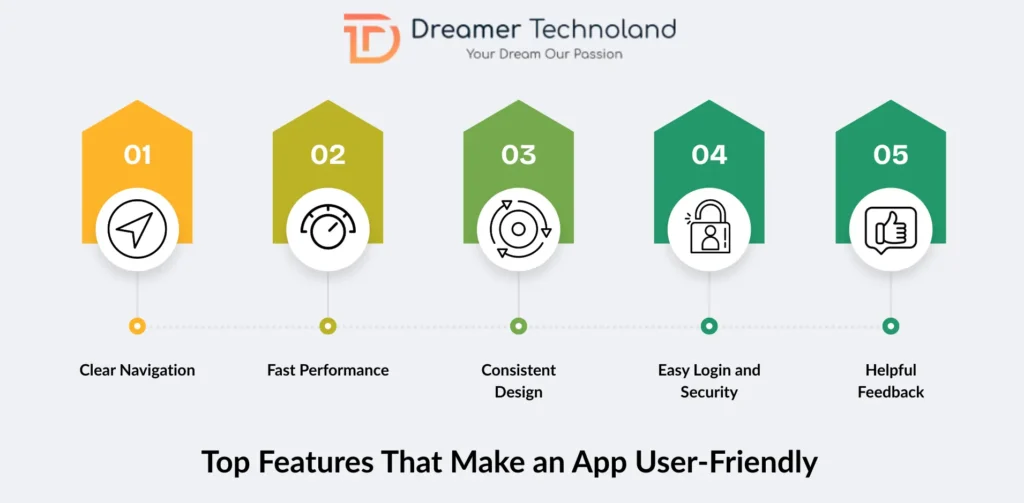
- Clear Navigation
Users should always know where they are and what they need to do next. Menus should feel obvious, not confusing. If someone opens an app and spends too much time searching for a basic feature, frustration begins immediately. Good navigation creates confidence because users feel in control. They should never feel lost inside the app.
- Fast Performance
No one likes waiting, especially on mobile devices. Even a few extra seconds can make users leave and never return. Speed affects trust because slow apps feel unreliable, even when the actual service is good. In 2026, fast performance is not a bonus feature. It is a basic expectation for every app.
- Consistent Design
Buttons, text size, colors, spacing, and layout should feel familiar across every screen. If one page feels completely different from another, users feel uncomfortable and confused. Consistency helps people learn the app faster because they know what to expect from every action.
- Easy Login and Security
Users want strong security, but they also want convenience. A complicated login process can make people abandon the app before they even begin using it. Features like biometric login, OTP verification, and secure saved sessions improve both trust and usability without creating extra stress.
- Helpful Feedback
When users make mistakes, the app should guide them instead of confusing them. Clear messages like “password too short” are much better than vague warnings like “something went wrong.” Helpful feedback makes the app feel supportive instead of frustrating.
What Common Mistakes Make Apps Hard to Use?
Sometimes apps fail not because they are missing features, but because small usability mistakes quietly push users away. These problems often seem small during development but create big frustration after launch.
Understanding the Common Mistakes That Make Apps Hard to Use helps businesses avoid these issues early.
- Too Many Features
Many businesses believe more features make the app stronger. In reality, too many options often create confusion. When users see too much at once, they struggle to decide what matters most. People usually prefer a clear and useful experience over a crowded app filled with unnecessary tools they never use.
- Weak Onboarding
If users cannot understand how the app works in the first few minutes, they often leave. A confusing first experience creates doubt and makes the app feel difficult. Good onboarding should guide users naturally without overwhelming them with too much information.
- Poor Search Options
This is especially common in shopping, service, and content apps. If users cannot quickly find what they need, frustration grows fast. Strong search and filtering save time and improve satisfaction immediately. A user should never feel like finding a product is harder than buying it.
- Ignoring Accessibility
Apps should work for different age groups, screen sizes, and user abilities. Small text, poor color contrast, and confusing layouts can quietly push away a large part of your audience. Accessibility is not an extra feature. It is part of good usability.
How Can You Improve App Usability Without Starting Over?
Many businesses think usability improvement means rebuilding the entire app from the beginning. That is not always true. Often, small improvements create the biggest results. This is where understanding How to Improve App Usability becomes practical.
- Watch Real Users
Sometimes the biggest problems are invisible to the business owner but obvious to users. Watching how people actually use the app reveals friction points faster than assumptions ever can. A small hesitation during checkout or confusion during login often tells you more than a long internal meeting.
- Remove Extra Steps
Every extra click creates another chance for users to leave. Shorter flows often improve results more than adding new features. Registration forms, checkout pages, and booking systems should always feel simple. The easier it is to finish a task, the better the experience becomes.
- Improve Speed First
Many teams focus on adding features while basic speed problems remain unsolved. A fast simple app usually performs better than a slow advanced one. Before adding complexity, make sure the foundation feels strong.
- Keep Updating
User expectations change quickly, especially in 2026. Apps that stay the same for too long often become outdated. Regular updates based on real feedback keep the experience fresh and competitive. Improvement should be continuous, not occasional.
What Are Real-World Examples of User-Friendly Apps?
Looking at successful apps helps explain usability better than theory. This is why Real-World Examples of User-Friendly Apps are useful for understanding what actually works.

- Uber: Booking a ride feels simple because the app focuses only on what matters most: location, ride choice, and confirmation. Users do not feel lost because every step is visually clear and easy to complete. The experience feels fast because unnecessary decisions are removed.
- Amazon: From product search to one-click buying, Amazon reduces effort at every stage. Users return because the app feels familiar, reliable, and efficient every time they shop. It proves that convenience is often stronger than visual beauty.
- Spotify: Even with millions of songs, users can quickly find what they want. Clean navigation and personalized recommendations make the experience feel easy instead of overwhelming. Its simplicity is what makes the platform feel powerful.
These apps succeed because they remove stress, not because they add more screens.
Why Should Businesses Invest in User-Friendly Apps Instead of Just More Features?
This is where many businesses make the wrong decision. They keep adding features because they believe complexity creates value. The truth is usually the opposite.
That is why Why Businesses Should Invest in User-Friendly Apps is a much smarter question.
- It Builds Customer Trust
People trust apps that feel reliable and easy to use. Confusing apps make businesses look unprofessional, even if the backend is technically strong. Trust directly affects loyalty because people stay where they feel comfortable.
- It Reduces Support Costs
When users can complete tasks easily on their own, businesses spend less time solving repeated support problems. Better usability quietly saves money in the background. A simple app often reduces complaints without the business even noticing it.
- It Creates Long-Term Growth
A user-friendly app improves retention, referrals, and customer satisfaction. These things create sustainable growth instead of depending only on advertising and constant user acquisition. Good usability keeps growth stronger for longer.
How Can Businesses Balance Features and Simplicity in 2026?
One of the biggest challenges in modern app strategy is balance. Businesses want powerful apps, but users want simple experiences. The solution is not choosing one over the other, but building both in the right order.
- Focus on User Goals
Instead of asking “what features can we add,” ask “what problem should this app solve?” This keeps development focused on value instead of unnecessary complexity. The best apps solve clear problems, not every possible problem.
- Launch Core Features First
Trying to build everything at once usually creates delays and confusion. Starting with essential features allows faster testing and better feedback from real users. This smarter approach also helps control Mobile App Development Cost because businesses avoid building features users may never need.
- Improve Based on Real Usage
Real users show what matters most. Their behavior often reveals better priorities than internal meetings or assumptions.
When decisions are based on actual usage, usability improves naturally.
Why Choose Dreamer Technoland for Building User-Friendly Apps?
Creating a user-friendly app is not only about writing code. It is about understanding how users think, what they expect, and how businesses can turn that into a smooth digital experience.
Dreamer Technoland focuses on building apps that are simple to use, technically strong, and ready for long-term growth. Instead of adding unnecessary complexity, the team builds around user behavior and business goals so the final product feels natural for customers and valuable for businesses.
From ios app development to android app development, they create scalable solutions with strong design, smooth performance, and continuous support after launch. Their approach combines usability, performance, and strategy so businesses get apps people actually want to keep using.
Whether you are exploring Mobile App Development Services or trying to understand How to find best mobile app development company, choosing a team that prioritizes real user experience always creates better results.
Conclusion
A successful app is not the one with the most features. It is the one people enjoy using. From simple navigation to fast performance, strong onboarding, and smooth checkout flows, usability shapes how users feel about your business. These details may look small during development, but they create the biggest difference after launch.
In 2026, users have too many choices to stay with an app that feels difficult. They expect speed, clarity, and trust from the very first interaction. That is why businesses that focus on user experience usually grow faster than those that focus only on functionality. Building a user-friendly app is not just a design decision. It is a business decision.
FAQs
Q. What makes an app user-friendly?
A. Clear navigation, fast performance, simple design, smooth onboarding, and helpful error handling are some of the biggest factors that make an app user-friendly.
Q. Why is user experience important for app success?
A. Good user experience improves trust, retention, and customer satisfaction. It also increases conversions and reduces uninstall rates.
Q. How can businesses improve app usability?
A. Businesses can improve usability by simplifying user flows, removing unnecessary steps, improving speed, and collecting real user feedback regularly.
Q. What are common mistakes that make apps hard to use?
A. Too many unnecessary features, poor onboarding, weak search options, and ignoring accessibility are common mistakes that make apps difficult to use.
Q. Should businesses focus on features or usability first?
A. Usability should come first because features only create value when users can access and use them easily without confusion.