

Every founding team building a mobile app today runs into the same question: does this app need generative AI, or does it just need to look like it does? That distinction matters more than it sounds. In 2025 alone, public repositories using large language model software development kits crossed 1.1 million, marking 178% year-over-year growth, according to Forbes’ breakdown of GitHub’s Octoverse 2025 report, proving generative AI has moved from pilot project to production infrastructure.
But infrastructure isn’t strategy. Businesses that bolt on a chatbot without a clear workflow behind it end up with a feature nobody uses and a bill nobody budgeted for. This piece breaks down what generative AI in mobile apps actually requires: the architecture choices, the realistic development cost, the risks worth planning for, and the questions worth answering before a single API call gets wired into your app.
Quick Overview: Generative AI in Mobile Apps at a Glance
Before we get deep into how to integrate AI into an existing mobile app, here’s the short version, the kind of summary you’d want if you only had two minutes.
- What it is: Generative AI in mobile apps means the app can produce a response, recommendation, or piece of content on the fly, based on what a user just typed, said, or uploaded, not from a pre-written list.
- Where it pays off: Conversational support, personalized recommendations, content and workflow automation, and voice or image-based interactions are the categories where teams see the clearest return.
- How it runs: You’ve got three real options: cloud API calls, on-device inference, or a hybrid setup, and the right one depends on latency needs, privacy rules, and how much control you want over the model.
- What it costs: A single well-scoped feature usually lands between $15,000 and $40,000. A full RAG-based integration across the app runs higher, and Generative AI Development Cost climbs fast once you add fine-tuning or a dedicated data pipeline.
- Timeline: Anywhere from six weeks for a simple API-based feature to eight months or more for something custom-built and production-hardened.
- Biggest risk to plan for: Wrong or made-up answers reaching a real user. Every serious implementation needs a review layer before launch, not after.
That’s the shape of the decision. Now let’s get into why each of these pieces matters.
What “Generative AI in Mobile Apps” Actually Means for Businesses
People throw the term around loosely, so it’s worth being precise about it before we go further.
You’ve had personalization in your app for years already: the “customers also bought” logic, the recommendation rules someone wrote once and hasn’t touched since. That’s not generative AI. It’s pattern matching against a fixed set of options. Generative AI does something different: it creates a response on the spot, shaped by whatever the user just typed or asked, rather than picking from a prebuilt list.
Here is how to integrate AI into an existing mobile app that actually works in real life. A user types “find me a jacket for a rainy hike under $150.” A traditional system runs that through filters and tags. A generative model actually reads the sentence, picks up on the intent, and can answer in plain language while still pulling real products from your catalog: no dropdown menus, no guessing which filter combination gets you close enough.
Technically, this comes down to connecting your app to a large language model like GPT-4.1, Claude, or Gemini 2.5, which are the ones teams reach for most right now, and wiring up the back-and-forth with something like LangChain or LlamaIndex. If the app needs to answer based on your own data rather than general knowledge, you’ll usually pair that with a vector database like Pinecone or pgvector so the model can search your product catalog or support docs before answering rather than making something up.
None of this is bleeding-edge anymore. It’s just how apps get built now. The real question is whether it’s actually worth the effort, and that’s what we’ll get into next.
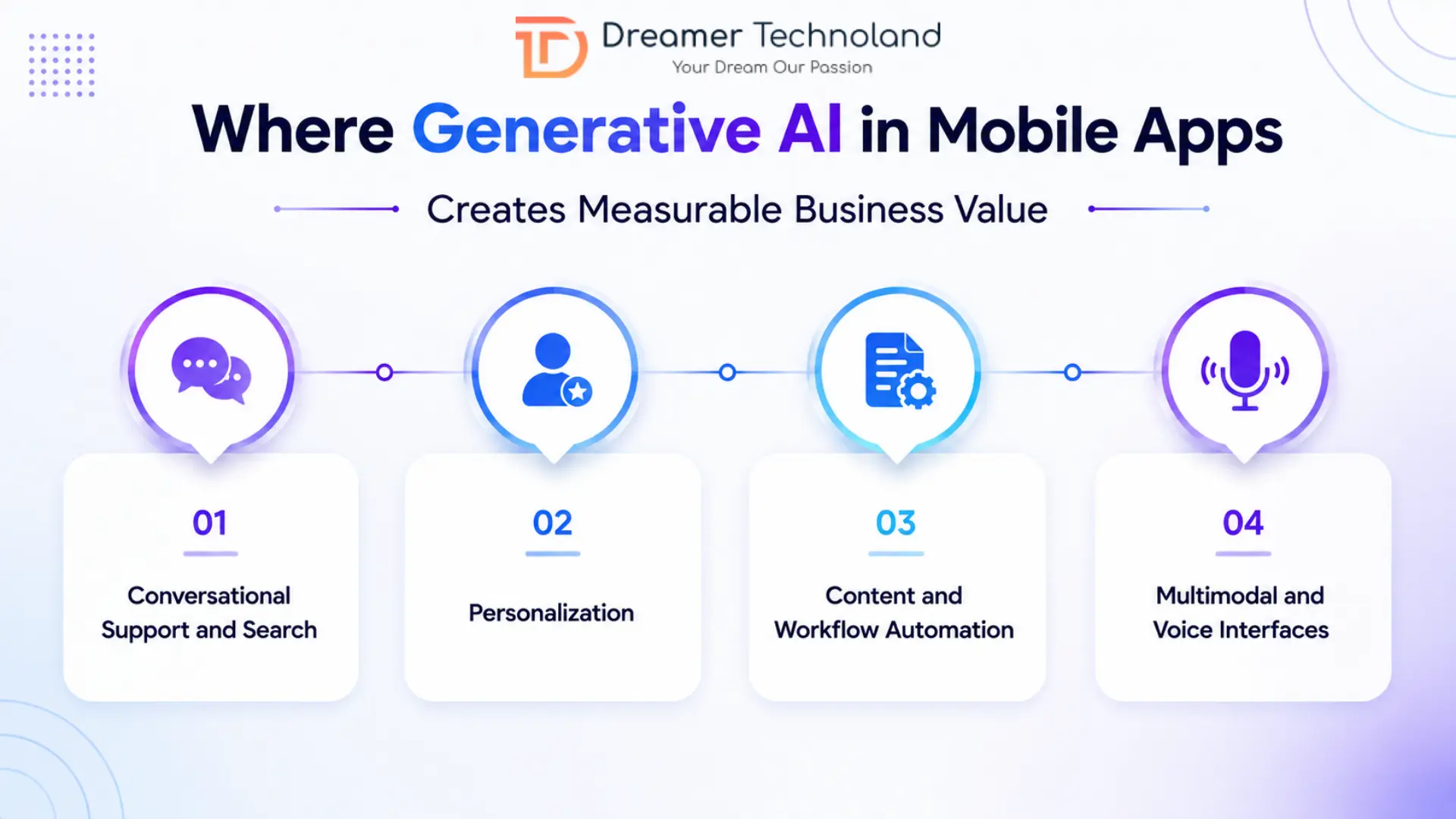
Where Generative AI in Mobile Apps Creates Measurable Business Value
Not every feature needs an LLM behind it. The teams getting real value from generative AI in mobile apps are the ones who picked one or two workflows where a static system was actually costing them something like lost conversions, support tickets, or users bouncing because the app felt generic. Here’s where that shows up most often.
-
Conversational Support and Search
This is usually the first place teams start, and for good reason; it’s the clearest ROI case. Instead of a support team drowning in “where’s my order” tickets, a retrieval-augmented chatbot pulls from your actual order data and policy docs to answer instantly. Search works the same way: a user can type a full sentence instead of guessing the right filter combination, and the app figures out what they mean.
-
Personalization
Traditional recommendation engines show everyone in a segment the same thing. But on the other hand, generative models can shape a response around what one specific person is doing right now: a travel app building an itinerary around someone’s actual stated budget and interests, not just their browsing history. That’s the difference between “customers like you” and “you.”
-
Content and Workflow Automation
Product descriptions, push notification copy, and internal reports- these eat up hours every week for marketing and ops teams. Generative AI handles the first draft, and a human reviews it. It’s not glamorous, but it’s often where the cost savings show up fastest, especially for teams building AI-powered mobile apps at scale across large product catalogs.
-
Multimodal and Voice Interfaces
Users increasingly expect to snap a photo and ask a question about it or talk to an app instead of typing. A user uploads a picture of a plant and asks what’s wrong with it. A field technician talks through a report instead of typing it on a cracked phone screen. This only works well when the underlying mobile app development is built to handle voice input, image processing, and AI responses without the experience feeling bolted together.
Architecture Decisions Before Writing a Line of Code
This is where most projects either stay on budget or start bleeding money: the architecture choice you make before any code gets written.
There are three real paths for integrating generative AI into mobile apps, and each one trades off differently on speed, cost, and control.
-
Cloud API calls
It is where most teams start, and honestly, where most should stay. You call OpenAI, Anthropic, or Gemini’s API, get a response back, and skip the infrastructure headache entirely. It’s fast to ship and easy to swap models later. The tradeoff is you’re paying per token, and every request needs a live connection.
-
On-device inference
Tools like Core ML on iOS, TensorFlow Lite (now LiteRT) on Android, or Gemini Nano through Android’s AICore let the model run locally on the phone itself. No round-trip to a server means faster responses, and nothing sensitive leaves the device, which matters a lot for healthcare or finance apps handling regulated data. The catch is model size. On-device models are smaller and less capable than their cloud counterparts, so they’re better suited to narrow tasks than open-ended conversation.
-
Hybrid setups
Split the difference: simple tasks run on-device; anything heavier gets routed to the cloud. Apple’s Foundation Models framework and ONNX Runtime Mobile both lean into this pattern, and it’s becoming the default for teams that want responsiveness without giving up capability.
There’s a fourth option worth mentioning for how to integrate AI into an existing mobile app: self-hosting an open-weight model like Llama or Mistral instead of using a hosted API. It buys you more control over data and cost at scale, but it also means owning the hosting, scaling, and maintenance yourself.
Whichever path you pick shapes everything downstream, including the number that founders actually ask about first: what this is going to cost.
Generative AI Development Cost and Realistic Timelines
Let’s talk numbers, because “it depends” isn’t an answer founders can take to a board meeting. Below is how the actual investment breaks down by project type, based on current 2026 industry pricing.
| Project Type | What’s Included | Cost Range | Timeline |
|---|---|---|---|
| Single AI Feature | Chatbot, smarter search, or a support assistant bolted onto an existing app | $15,000 – $40,000 | 4 – 8 weeks |
| Custom RAG Pipeline | Vector database, proprietary data integration, app-wide personalization | $60,000 – $120,000 | 3 –6 months |
| Mid-Size Custom Application | Multi-feature build with fine-tuned prompts and workflow automation | $150,000 – $250,000 | 5– 9 months |
| Enterprise-Grade Platform | Fine-tuned models, multi-agent workflows, full compliance and governance layer | $250,000 – $700,000+ | 9 – 18 months |
Note: A few things worth noting before you pick a row and run with it. Healthcare and fintech apps almost always land at the higher end, mostly because of the compliance work layered on top—HIPAA, GDPR, SOC 2, and that kind of thing add real engineering hours. And unlike traditional software, generative AI isn’t a one-time cost. Every user interaction burns tokens, so plan for ongoing inference costs to run 20 to 45 percent of your original build annually. That’s not a maintenance fee; that’s the app actually getting used. For more details, here is our complete guide on generative AI development costs, as there are multiple variables that can fluctuate your budget later.
If you’re weighing whether to build this in-house or bring in a partner, our generative AI development services team scopes exactly these tradeoffs before a single line of code gets written.
Risk, Data Privacy, and Governance Businesses Must Plan For
It is something that nobody puts in a pitch deck: generative AI gets things wrong sometimes, and if you haven’t planned for that, your users find out before you do.
The technical term is “hallucination”; the model states something false with total confidence. It’s not a bug you patch once and forget. It’s an ongoing risk that needs a review layer built into the product from day one, not bolted on after a bad headline.
The risks worth planning for:
| Risk | What It Looks Like | How Teams Handle It |
|---|---|---|
| Hallucinated responses | The model gives wrong info with full confidence | Human review loops, confidence scoring, fallback to human support |
| Data privacy exposure | User data sent to third-party model providers | On-device inference, data anonymization, clear consent flows |
| Regulatory non-compliance | Healthcare or fintech apps mishandling sensitive data | HIPAA/GDPR-aligned architecture from the design phase |
| Model drift and deprecation | Provider retires or changes a model your app depends on | Multi-model fallback, avoiding hard lock-in to one vendor |
| Vendor lock-in | App architecture tied entirely to one API | Abstraction layers that let you swap providers without a rebuild |
The businesses that get burned aren’t the ones who added generative AI. They’re the ones who added it without a plan for what happens when it’s wrong.
Case Study: How This Plays Out in Practice
Theory is easy. Here’s what generative AI app development actually looked like for one client.
A mid-sized staffing firm came to us managing 40 open job requisitions with a recruiting team of six people. At roughly 250 applications per posting, that’s 10,000 resumes sitting in an inbox, with recruiters manually screening each one before a single candidate got a callback. So, the challenge was finding time to look at resumes in the first place.
We built one of our AI-powered mobile apps for this client: a recruitment platform that automated the first pass of resume screening using a RAG-based pipeline, matching candidate qualifications against each job’s actual requirements instead of relying on rigid keyword filters. Recruiters still made every hiring decision; the AI just handled the repetitive part that was eating their week. This is the kind of project that shows what integrating generative AI into mobile apps looks like once you get past the theory and into an actual production build.
What changed:
- Resume screening time dropped from days to minutes per requisition
- Recruiters spent their time on qualified candidates instead of sorting through everyone
- The matching logic improved over time as it processed more hires
You can read the full breakdown, including the architecture decisions and what we’d do differently, in our AI-powered recruitment platform case study.
The pattern isn’t unique to recruiting. It shows up anywhere a team is drowning in repetitive, judgment-light work, which is exactly the kind of problem generative AI in mobile apps is built to solve, provided it’s scoped to one real bottleneck instead of added because everyone else is doing it. If you’re still figuring out how to add generative AI to a mobile app you already run, starting with the single most painful manual process is almost always the right first move.
A Practical Checklist on How to Integrate AI into an Existing Mobile App
Before you sign off on a generative AI app development project, run through this list. It’s the difference between a feature that earns its budget and one that quietly gets buried in a future roadmap. This is the same checklist we walk clients through before scoping how to add generative AI to a mobile app they already run.
| # | Question to Ask | Why It Matters |
|---|---|---|
| 1 | Is there a specific, painful workflow this solves? | Not “we should have AI somewhere,” an actual bottleneck, like the resume screening problem in the case study above. |
| 2 | Is your data ready? | Generative AI in mobile apps only works as well as what it’s pulling from. Messy, outdated, or scattered data means messy, outdated, or scattered answers. |
| 3 | Have you picked an architecture, not just a model? | Cloud API, on-device, or hybrid—this decision shapes cost, speed, and privacy long before anyone talks about which LLM to use. |
| 4 | What’s the privacy exposure? | If user data is financial, medical, or otherwise sensitive, know exactly what leaves the device and what a user has consented to. |
| 5 | Do you have a review loop for wrong answers? | Every feature in AI-powered mobile apps needs a plan for what happens when the model gets it wrong, because it will, eventually. |
| 6 | Is there a path back to a human? | Users need a way out of the AI interaction when it’s not working for them. Non-negotiable in support or healthcare contexts. |
| 7 | Have you budgeted for ongoing costs, not just build costs? | Inference bills don’t stop after launch. Plan for 20–45% of build cost annually, not a flat maintenance line. |
| 8 | Are you testing before scaling? | Ship the smallest useful version first. Watch how real users interact with it before deciding what to build next. |
If you can answer all eight with confidence, you’re not just integrating generative AI into mobile apps for the sake of it; instead, you’re building something that holds up once real users start pushing on it. That’s the whole point of doing generative AI app development this way instead of chasing a trend.
How Can Dreamer Technoland Help?
We’ve walked through every piece of this checklist with clients before writing a single line of code because that’s where most generative AI projects actually go wrong. Our team scopes the specific workflow first, picks the right architecture for your app’s constraints, and builds with the same tools mentioned throughout this piece: LangChain and LlamaIndex for orchestration, RAG pipelines for grounded answers, and on-device or hybrid setups where privacy or latency demands it.
Some clients need one contained AI feature. Others need it built into a larger platform, alongside broader custom software development services covering everything from backend architecture to API integrations. Either way, we start with discovery.
If you’re weighing your options for your next build, book a free consultation; we’ll help you figure out what’s actually worth building first.
Key Takeaways: Is Generative AI Right for Your App?
Here’s the honest answer: probably, but not everywhere at once.
The businesses getting real value from generative AI in mobile apps aren’t the ones with the most AI features. They’re the ones who picked one genuine bottleneck- a support queue, a screening process, a search bar nobody could find anything in and built something that actually fixed it. Everything else in this piece- the architecture decisions, the Generative AI Development Cost breakdown, and the risk planning- exists to support that one choice.
If you’re still asking how to add generative AI to a mobile app without overbuilding or blowing the budget, the checklist above is your starting point. Answer those eight questions honestly before you touch a line of code.
Generative AI app development isn’t a trend to chase. It’s infrastructure now, the same way cloud hosting or push notifications became infrastructure a decade ago. The apps that treat it that way, scoped, tested, and monitored, are the ones still standing when the novelty wears off, and users just expect it to work.
Frequently Asked Questions
Q. What does it cost to add generative AI to a mobile app?
A single feature bolted onto an existing app typically runs $15,000–$60,000. A full RAG-based integration with your own data runs $70,000–$180,000, and enterprise-grade builds with compliance and fine-tuning start around $250,000. Generative AI development costs also includes ongoing maintenance costs, usually 20–45% of the build price annually.
Q. Should every mobile app use generative AI?
No. It earns its place when it solves a specific, measurable problem, not because competitors have it. Adding it without a clear workflow behind it usually means a feature nobody uses and a bill nobody planned for.
Q. On-device or cloud AI: which is better for mobile apps?
Depends on the use case. Cloud APIs are faster to ship and easier to update. On-device inference (Core ML, TensorFlow Lite, Gemini Nano) keeps data local and works offline, which matters for healthcare or finance apps. Most teams eventually land on a hybrid setup.
Q. How much time does generative AI app development take?
A single feature takes 6–10 weeks. A mid-complexity custom build runs 4–9 months. Enterprise-scale platforms with compliance layers can take 10–18 months.
Q. How to Integrate AI into Existing Mobile Apps?
Start with one workflow, usually support or search; connect it to an LLM API; and add a human review layer before launch. Don’t rebuild the whole app around AI on day one; prove the smallest version works first.